Version 1.0 - Last Updated: 15 Jul 2026
SIS LLE guidance
Withdrawal CoC - expected delivery 01.12.2026
You should use a Withdrawal CoC when a student withdraws from their course after you've confirmed their registration.
A withdrawal means the point when a student’s scheduled learning, teaching and assessment activities and other active and ongoing engagements end in agreement with you. It also means the student does not intend to return. They'll have no further obligation to pay fees to you.
This terminates their period of student finance eligibility. We'll recalculate their maintenance and tuition fee support entitlement.
If a student tells us that they intend to withdraw from a course, we'll suspend their maintenance payments. You must discuss the withdrawal with the student.
You must submit Withdrawal CoCs as soon as you can and accurately. This is to make sure our payments to the student and to you are correct and on time.
The service level for CoC processing is 20 working days in off-peak periods. During peak periods (from August to the end of November) it is 30 working days.
We can process Withdrawal CoCs through the automated service if they match the criteria for this. The processing time for an automated CoC is 48 hours. To maximise the likelihood of your CoCs being automatically processed, please follow the steps in this guide when you submit them.
You can create a CoC manually from LLE Applications area. You can also create them in bulk by uploading a csv file. This guide will tell you how to use the Create CoC function. If you'd like the technical specification with information on the bulk upload process, please refer to the HE Gateway.
- Go to the SIS Homepage and select LLE Applications
- This will open the LLE Applications page
- Search for your student with the search options available
- Select Display Results

- Select the Create button in the Create CoC column

- Select Withdrawal from the Change of Circumstance Type dropdown
- Select Continue
- The student’s details will be automatically populated
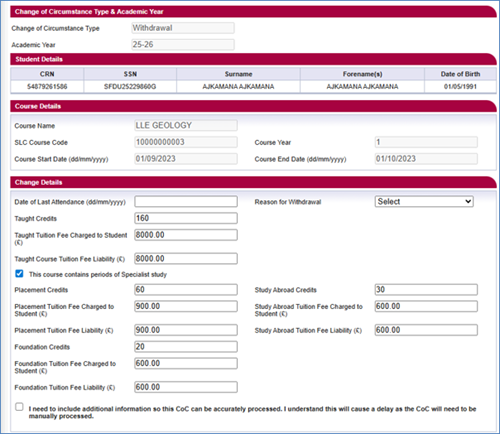
- Enter the Date of Last Attendance. This must be on or before the course end date. We use this to process the student’s funding entitlement.
Attendance on a course means active and ongoing engagement with the activities and learning opportunities you offer. These include, but are not limited to, scheduled learning and teaching activities.
If the student attended for the full first day of the applicable term, you should submit the last date of attendance as the second day of that term. - Select a Reason for Withdrawal from the dropdown menu. You can find out more about reason codes in the Withdrawal CoC reason codes chapter. The options are:
- Never Attended – confirmed in error
- Enrolled – Never Attended
- Left during cooling off period
- Left during course
- Health
- Deceased
11. If you need to add additional information to this CoC, you must select the checkbox after the line saying, 'I need to include additional information so this CoC can be accurately processed. I understand that this will cause a delay as the CoC will need to be manually processed.'
12. When you've entered all the details for the CoC, you must now select a contact for the CoC. This will be a registered person at your university or college whom we can contact about this CoC. Use the radio buttons within the Contact Details section to select the contact.
13. Select Submit
Print this chapter