Version 1.0 - Last Updated: 15 Jul 2026
SIS LLE guidance
Attendance Worklist

Select LLE Applications from the main menu.
There are a number of fields available in the Course section:
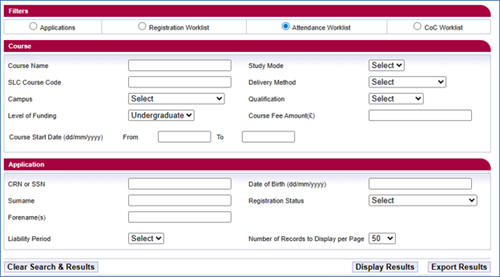
- Course Name: you must enter at least 3 characters to perform a search; wildcards are no longer required.
- SLC Course Code: you must enter at least 3 characters to perform a search; wildcards are no longer required.
- Campus: to select a specific campus, highlight the campus location from the dropdown list.
- Level of Funding: although LLE is limited to undergraduate funding, a dropdown will be presented, if you choose to use this option.
- Course Start Date From and To: enter the start date for the courses or modules you want to view, for example, to view all courses that start on 1 August, enter 01/08/2026 in both the From and To fields. To view courses that start between 1 and 31 August, enter 01/08/2026 in the From field and 31/08/2026 in the To field. You should enter this in dd/mm/yyyy format.
- Study Mode: a dropdown menu with a choice of modes of study.
- Delivery Method: a dropdown menu with a choice of delivery methods.
- Qualification: a dropdown menu with a choice of qualification.
- Course Fee: enter the full course or module fee rate you're charging in this field.
Application selection fields
- CRN or SSN: these are unique student identifiers issued by us.
- Surname: the student’s name.
- Forename(s): the student’s name.
- Liability Period: a dropdown menu allowing for the selection of a payment instalment points 1-4.
- Date of birth: the format is dd/mm/yyyy.
- Registration Status: the student’s registration status.
- Number of Records To Display: the number of search results per page. The default is 50, but you can change it to 100 or 200.
Print this chapter
Was this page helpful?
Thank you for your feedback
This site is protected by reCAPTCHA and the Google
Privacy Policy and
Terms of Service apply.