Version 1.0 - Last Updated: 15 Jul 2026
SIS LLE guidance
LLE CoC Import Results
After you've selected CoC, the Import Results Filter will appear.
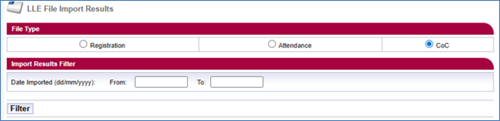
You'll see the following search options:
Date Imported (dd/mm/yyyy) From / To
The date range you want to check for file imports. You must use both of these fields.
Filter
After selecting the filter button, you'll see a list of all submitted CoC import files.
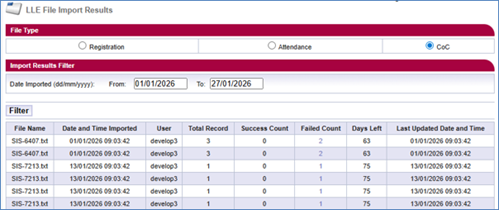
The following headers will display on the page:
- File Name
- Date and Time Imported
- User
- Total Record
- Success Count
- Failed Count
- Days Left
- Last Updated Date and Time
Print this chapter
Was this page helpful?
Thank you for your feedback
This site is protected by reCAPTCHA and the Google
Privacy Policy and
Terms of Service apply.