Version 1.0 - Last Updated: 15 Jul 2026
SIS LLE guidance
Attendance — Expanded Application Detail section

Select +/ - (Expand/ Collapse) to view the full application details in an expandable window underneath the selected Applications row. This is known at the Expanded Application Detail Section.
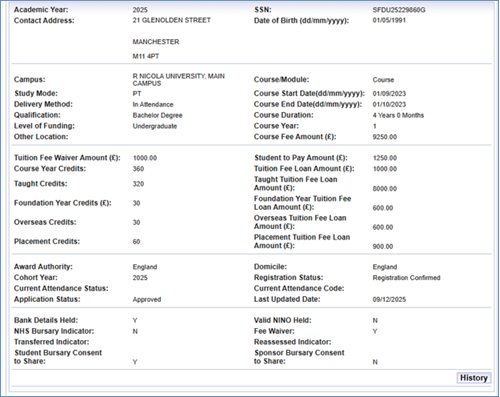
There are a number of fields available in the Expanded Application Detail Section:
- Academic Year: the Academic Year of study.
- Contact Address: the students contact address.
- SSN: Student Support Number.
- Date of Birth (dd/mm/yyyy): in dd/mm/yyyy format.
- Campus: the Campus address.
- Study Mode: the mode at which the student is studying.
- Delivery Method: the student’s attendance method.
- Qualification: the qualification studied.
- Level of Funding: the level of funding for the course or module.
- Other Location
- Course/Module: displays either course or module.
- Course Start Date(dd/mm/yyyy): study period start date.
- Course End Date(dd/mm/yyyy): study period end date.
- Course Duration: the course or module duration
- Course Year: the course year
- Course Fee Amount (£): course fee amount confirmed by the student
- Tuition Fee Waiver Amount (£): the amount of tuition fee waiver awarded.
- Course Year Credits: the number of credits associated with the course or module; this is populated from the data entered in CMS.
- Taught Credits: the amount of taught credits.
- Foundation Year Credits (£): the amount of foundation year credits.
- Overseas Credits: the amount of overseas credits.
- Placement Credits: the amount of placement credits.
- Student to Pay Amount (£): the amount payable by the student.
- Tuition Fee Loan Amount (£): the tuition fee loan amount that has been awarded.
- Taught Tuition Fee Loan Amount (£): the taught tuition fee loan amount that has been awarded.
- Foundation Year Tuition Fee Loan Amount (£): the foundation year tuition fee loan amount that has been awarded.
- Overseas Tuition Fee Loan Amount (£): the overseas tuition fee loan amount that has been awarded.
- Placement Tuition Fee Loan Amount (£): the Placement Tuition Fee Loan amount that has been awarded.
- Award Authority: the student’s award authority.
- Cohort Year: the year in which the student is assessed for a period of continuous study.
- Current Attendance Status: this shows the current attendance status of the student. The options are:
-
- Awaiting attendance confirmation
- Attendance confirmed
- Attendance confirmation not required
- Awaiting Reassessment
- Application Status: this shows the attendance code you've saved for the student.
- Domicile: the student’s domicile.
- Registration Status: this shows the current registration status of the student. The options are:
-
- awaiting registration confirmation
- registration confirmed
- registration confirmation not required
- Current Attendance Code: this shows the attendance code you've saved for the student.
- Last Updated Date: the last updated date of the application.
- Bank Details Held: this shows if we have the student’s bank details (yes or no).
- NHS Bursary Indicator: this shows if the student has applied for an NHS Bursary (yes or no).
- Transferred Indicator: this shows if the student has transferred from another provider.
- Student Bursary Consent to Share: this shows if the student has given consent to share their data (yes or no).
- Valid NINO Held: this shows if we have a valid National Insurance number for the student (yes or no).
- Fee Waiver: this shows if the student has been awarded a fee waiver (yes or no).
- Reassessed Indicator: this shows if the student has been reassessed (yes or no).
- Sponsor Bursary Consent to Share: this shows if the student’s sponsor has given consent to share their data (yes or no). If there are 2 sponsors this will only show as yes if both sponsors have given consent to share.
History Button
Clicking on the history button will display all of the transactions, Registration, Attendance and Change of Circumstances for the student you are viewing.
Print this chapter
Was this page helpful?
Thank you for your feedback
This site is protected by reCAPTCHA and the Google
Privacy Policy and
Terms of Service apply.