Version 1.0 - Last Updated: 15 Jul 2026
SIS LLE guidance
Attendance Worklist

Select LLE Applications from the main menu.
There are a number of fields available in the Course section:
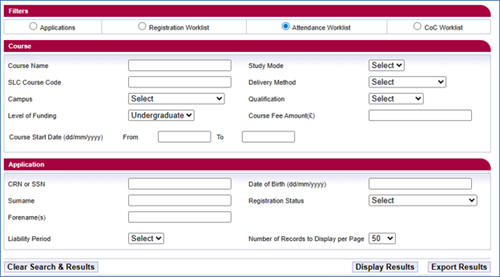
- Course Name: you must enter at least 3 characters to perform a search; wildcards are no longer required.
- SLC Course Code: you must enter at least 3 characters to perform a search; wildcards are no longer required.
- Campus: to select a specific campus, highlight the campus location from the dropdown list.
- Level of Funding: although LLE is limited to undergraduate funding, a dropdown will be presented, if you choose to use this option.
- Course Start Date From and To: enter the start date for the courses or modules you want to view, for example, to view all courses that start on 1 August, enter 01/08/2026 in both the From and To fields. To view courses that start between 1 and 31 August, enter 01/08/2026 in the From field and 31/08/2026 in the To field. You should enter this in dd/mm/yyyy format.
- Study Mode: a dropdown menu with a choice of modes of study.
- Delivery Method: a dropdown menu with a choice of delivery methods.
- Qualification: a dropdown menu with a choice of qualification.
- Course Fee: enter the full course or module fee rate you're charging in this field.
Application selection fields
- CRN or SSN: these are unique student identifiers issued by us.
- Surname: the student’s name.
- Forename(s): the student’s name.
- Liability Period: a dropdown menu allowing for the selection of a payment instalment points 1-4.
- Date of birth: the format is dd/mm/yyyy.
- Registration Status: the student’s registration status.
- Number of Records To Display: the number of search results per page. The default is 50, but you can change it to 100 or 200.